
Florida Wills & Trusts
January 2014 Update
_______________________________________________________________
Supreme Court Rules on DOMA
On June 26, 2013, the United States Supreme Court dealt with the hotly debated issue of same-sex marriage. In its decision in United States v. Windsor, the court ruled 5-4 that a portion of the Defense of Marriage Act (DOMA) that denied federal benefits to legally married same-sex couples was unconstitutional. The court held that the equal protection clause requires that same-sex couples whose marriages are valid under the law of their state of domicile be treated married for federal purposes. On August 29, 2013, with Revenue Ruling 2013-17, Treasury extended this decision when it ruled that a same-sex couple who is legally married in a jurisdiction that recognizes same-sex marriages will be considered married for federal tax purposes regardless of where the couple lives.
Revisions to the Florida Power of Attorney Act
Effective May 30, 2013 revisions were made to the Florida Power of Attorney Act as recommended by the Real Property, Probate, and Trust Law Section of The Florida Bar. The revised law provides additional exceptions to the applicability of specified power of attorney provisions; provides that an original power of attorney may be required for recording in official records for real estate transactions; adds exceptions to delegation provisions; authorizes third person to require an agent to execute affidavit stating that agent's authority was not terminated because of certain circumstances; revises form for affidavits; requires third person who rejects power of attorney to state reason for rejection in writing; provides for notice to broker-dealer; revises provisions relating to when notary may sign principal's name to documents; clarifies that certain gift amounts are based on calendar year; specifies that broker-dealer does not have duty to inquire into certain actions by an agent and is not liable for relying in good faith on an agent's actions; provides that agent acquires general authority regarding securities held by broker-dealer. Where applicable, the Florida Wills & Trusts program has been revised accordingly.
Increased Federal Tax Exemptions (effective January 1, 2014)
Applicable Exclusion Amount: $5,340,000 (from $5,250,000)
GST Exemption Amount: $5,340,000 (from $5,250,000)
Gift Tax Annual Exclusion Amount: $14,000 (no change from 2013)
See IRS Revenue Procedure Revenue Procedure 2013-35 for additional adjustments.
Documents Revised for Same-sex Couples
All documents have been revised to include appropriate pronouns for same-sex couples. New ‘Gender of Same-sex Couple’ and ‘Same-sex Refer to As’ questions have been added to resolve pronouns correctly as well as replace ‘Husband’ and ‘Wife’ terms, where appropriate. A new same-sex choice has been added to the “Is Client Married?’ question and the ‘Husband/Wife’ choices have been replaced by ‘Spouse 1’ and ‘Spouse 2.’ New Questions 4, 25, 26 and Questions 23, 24, 64, 132, 266, 286, 301, 315, 957
New Homestead Options
Homestead devise in Pour-over Will - The purpose of this provision is to allow a specific gift of homestead to a spouse if ownership would otherwise be restricted under the Florida Constitution. Making this gift in the pour-over Will eliminates the need to address the homestead issue in the Revocable Trust, as a residuary devise to a revocable trust will not overcome the constitutional restrictions if the decedent is survived by a spouse (with or without minor children), and an additional gift to the spouse would otherwise need to be included in the trust. New Question 127
‘Homestead Trust’ article in Clause Bank – For irrevocable trusts only, the 'Homestead Trust' choice will appear for clients who are married or who have minor children. The irrevocable trust, whichever flavor is chosen, can then function as a Homestead Trust as provided in Fla Stat.§732.4017. Once in the word processor you will need to replace Article 3: Irrevocable Trusts with this new Homestead Trust article. Question 1486
New Pourover to Spouse’s Revocable Trust Option
The program now includes a new marital gift option to pour over a marital gift to the surviving spouse’s revocable trust (rather than leave it outright), or in a joint trust, to shift what would have been an outright gift to the surviving grantor’s share. Question 344
Revised Text for Beneficiary As Trustee of Descendants Trust
If the drafter chooses to make each beneficiary a trustee of his or her separate trust under the Trusts for Descendants, the beneficiary may prefer not to be a trustee (or be unable); this revision requires the beneficiary to opt in before serving as a trustee. Question 785
New Digital Assets Power Added to Fiduciary Powers
A new ‘Digital Assets and Access’ power has been added regarding access and control all of the Grantor's assets held in digital or virtual form (such as music, pictures, account credits, virtual money, etc.). The text is automatically included in the ‘Fiduciary Powers’ article so there is no related question. The language is added only for long powers, generally Standalone Wills and Revocable Trusts.
New Election for Portability Added
The Tax Relief, Unemployment Insurance Reauthorization, and Job Creation Act of 2010 ("TRA 2010") introduced the concept of portability by providing that the first spouse to die may transfer his or her unused Applicable Exclusion Amount to a surviving spouse for use against the latter’s estate taxes. Congress, never one to pass up a good acronym, named this the deceased spousal unused exclusion amount (the "DSUEA").
This new option gives various instructions to the fiduciary how to make (or not make) the DSUEA election in the client's estate. Because of the likely high cost of preparing and filing an estate tax return, options are given for charging the costs of that return. The most important function of this new provision is to give guidance to, and to exonerate from liability, the fiduciary who may be in a conflicting position among beneficiaries.
While this new approach can simplify plans tremendously, it has several potential disadvantages. In a nutshell, it does not apply to the GST Exemption; only the unused exemption of the last deceased spouse is allowed; and, unlike trusts, assets given to the spouse in anticipation of portability are still subject to dissipation and creditors’ claims. New Question 958
New Pass Through and Conduit Trust Options
The program now includes expanded options to address qualified plan proceeds (Section 2039 assets). Options include a See-Through Trust or a Conduit Trust. New Questions 1055-1057
New Option to Omit Table of Contents
This question is now a multi-select that allows you to omit or include the table of contents. Question 1133
New Scratch Pad Feature and Question
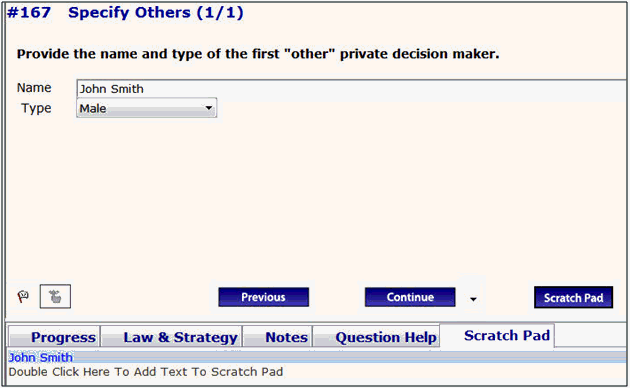
The Scratch Pad allows you to save or copy text for use in a later question, or save text from one file into the Scratch Pad for use in a different file. Examples include names and/or addresses for agents, trustees, personal representatives, executors, etc. The Scratch Pad button is ONLY available ("enabled") for questions that allow text to be entered as in the screen shot (below) where it is being used to save the name of the corporation “XYZ Company” for possible use in another question.
In addition, a new Scratch Pad choice was added at the opening menu allowing you to enter names/info directly into the Scratch Pad at the start of a NEW file. For more details on the functionality, click on the Scratch Pad button and select "About Scratch Pad." Question 1 and New Question 19
Most Recently Used File Feature Added
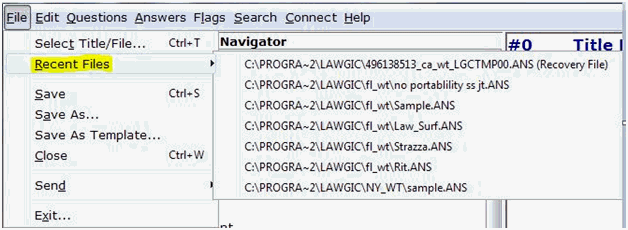
The program now lists your 7 most recently saved files (including a backup of the last file used) by selecting Recent Files from the File menu once inside the Lawgic program.
New Search Feature
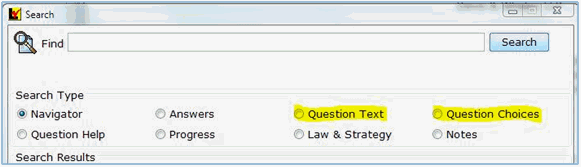
Our Search feature (on Menu Bar) allows a user to find specific text within sections of the program. We have added two new areas for searching: ‘Question Text,’ meaning the text that makes up each question, and ‘Question Choices,’ which are the options shown for each question.
New Flag Menu Items
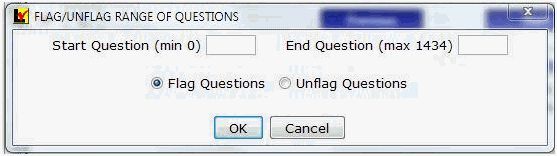
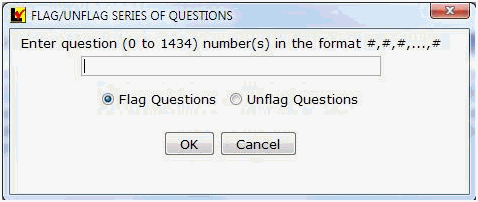
Two new items on the Flag menu give you the ability to flag multiple Questions at once, within either a Range (sequential) or a Series (individual). With this tool, you can manipulate files and easily create templates by clearing or loading questions.
Flag Question Range
Flag Question Series
HELP Menu Revised
All items on the Lawgic HELP menu – Help, Resources, About Our Authors, and License Agreement -- now link to the Lawgic web site allowing for faster updating and revisions to material.
* * * * *
To view those questions that are new in this update, or where Law & Strategy, choices, or default answers have changed, use the "Up_Jan14" flag file. From inside Lawgic, open any existing answer file; on the Flags menu, click Open Flags, select the appropriate Title (click OK), and next select the "Up_ Jan14" flag file (and click OK). To view all flagged questions, click Expand All on the Answers menu and scroll the Navigator. Flagged questions will be indicated with blue bold text.
Please continue to send us your suggestions on existing or new products. Contact our Technical Support Department at 1-877-2-LAWGIC (252-9442) or e-mail us at support@lawgic.com.
Copyright (c) 2014 Lawgic, LLC, a Florida limited liability company (“Lawgic”).
All Rights Reserved. Lawgic and Intelligent Legal Technology are registered trademarks of Lawgic, LLC.