
Florida Wills & Trusts
Updated Product Features
New “Generic Irrevocable Trust” Added
In response to customer requests a new ‘Generic Irrevocable Trust’ document has been added. Question 3
DPA Format Options Enhanced
A new ‘DPA Format?’ question replaces the old “Short Form” Yes/No question. There are now 3 choices – Full Version, Select Individual Provisions and Short Form. The ability to customize the DPA has been enhanced with the addition of the “Select Individual Provisions” choice which when selected takes the user to Question 6 (DPA Provisions Included) where provisions can be selected ‘a la carte.’ Note: the word “SIMPLE” was omitted from the title of the ‘short form’ DPA. Question 5 and Question 6.
New Safekeeping Power of Attorney Letter
This letter advises the client that the law firm is holding an original Power of Attorney for safekeeping intended for emergency use only, such as if all other originals and copies are lost or inadvertently destroyed. It is an alternative to using the DPA ‘Escrow instructions from client to attorney’ available at Question 4 ("DPAs and Related Doc'ts"). Question 11
4-Digit Social Security Number (SSN) Now Used for Declaration of Preneed Guardian
The Declaration of Preneed Guardian now uses the last 4-digit SSN which is also used by the Durable Power of Attorney and Revocation of DPA. In addition, the SSN questions have been reformatted and are now in bundle form asking for the numbers separately. New Questions 34-36 and 46-48. Deleted old Questions 33 and 43.
Successor Trustee Option Expanded for Outright Distributions
Based on customer requests, a Successor Trustee provision will now automatically be included in the Provisions Governing Trustee article if distributions are outright but grantor is not sole initial trustee. Questions 802-807 and Question 809.
New DPA Signature Line Format Option
A new question has been added to clarify the signature line formatting. Under the Florida Power of Attorney Act, Fla. Stat. 709.2106(5), a photocopy or electronically transmitted copy of an original power of attorney has the same effect as the original. Historically, attorneys might hold the original documents for a client and provide a photocopy of the set of documents for the client's reference. Likewise, for informational integrity, the photocopy would include the reproduced signature of the client and the witnesses.
Under the new law, such a photocopy sent to a client could be taken by the AIF before it was intended that he or she do so, and used. The better practice if the attorney continues to hold the original documents with the intent to safeguard them is to provide the client with an unsigned copy of the power of attorney for reference.
Three choices are now available in the program:
“Add restricted language to original” – this is the default. It adds the following restricted language over the signature line to make it clear it is not a photocopy of the signed document:
FOR INFORMATION ONLY
NOT VALID FOR USE
The initial draft page (presumably sent to the client in this form) can then be preserved to be added to the client's file copy of the power, eliminating the chance that an unwanted signed photocopy might be found.
"No restricted language" omits the restricted language over the signature line.
"Duplicate execution portion with restrictive language" is a combination of the two where it will remove the restricted language above the signature line but also create a duplicate execution page which includes the restricted language.
New Question 1239
Clause Bank Question Revised – New Decanting Power Added
In order to clarify its use, the clause bank question was revised from a ‘Yes/No’ to a multi-select question. The clause bank was initially created to provide a place for the editors to add provisions that might not necessarily fit in any particular part of the program but that the user might want to use. Despite its name, however, the clause bank is not the place for users to add their own custom provisions which is why we included the ‘Add Custom Provisions’ questions throughout the program. In addition, a new Decanting power was added. Question 1468
Software Upgrades
Revisions to Software Interface
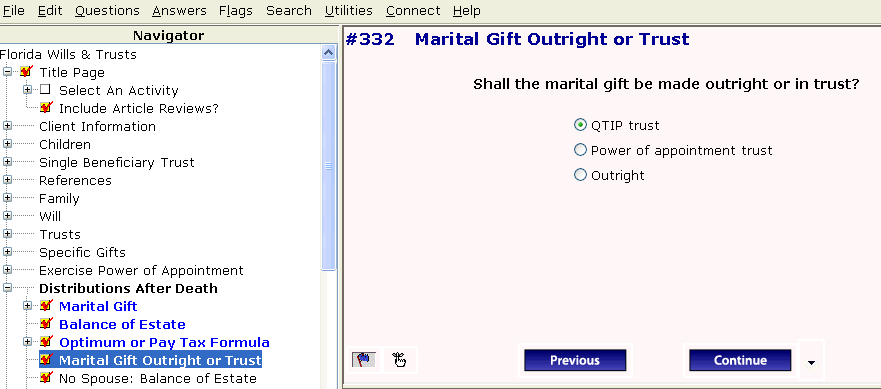
Revisions to the software have been made, including a different font type and an increased font size for greater readability. In addition, the question text is now bolded as well as the main headings in the Navigator when the Navigator is expanded. When the ‘flag’ icon is selected it is now blue instead of red and is indicated in the Navigator as blue bold.
* * * * *
To view those questions that are new in this update, or where Law & Strategy, choices, or default answers have changed, use the "Up_Jul12" flag file. From inside Lawgic, open any existing answer file; on the Flags menu, click Open Flags, select the appropriate Title (click OK), and next select the "Up_Jul12" flag file (and click OK). To view all flagged questions, click Expand All on the Answers menu and scroll the Navigator. Flagged questions will be indicated with blue bold text.
Please continue to send us your suggestions on existing or new products. Contact our Technical Support Department at 1-877-2-LAWGIC (252-9442) or e-mail us at support@lawgic.com.
Copyright (c) 2012 Lawgic, LLC, a Florida limited liability company (“Lawgic”).All Rights Reserved. Lawgic and Intelligent Legal Technology are registered trademarks of Lawgic, LLC