
Florida Wills & Trusts
June 2016 Update
_______________________________________________________________
Updated Product Features
Expanded Substance Abuse Article and Renamed “Restricted Behaviors”
Formerly called Substance Abuse, this article has been expanded to address other types of dependencies or addictions, e.g., compulsive gambling. We have added an option to include withholding assets from a beneficiary who is incarcerated, including possible forfeiture of undistributed amounts. Based on comments by corporate fiduciaries, we have expanded the ability of the trustee to disclose results of tests (if compelled by law) and the procedures for notifying a beneficiary of such disclosure. New Questions 710 and 711 and Question 695
New Arbitration Option for Dispute Resolution Provision
The dispute resolution provision has been enhanced by adding a new “complex” option that mandates arbitration (and redesignating the former language as the “simple” choice). The more elaborate provision directs mediation first to resolve disputes, but if unsuccessful, arbitration becomes mandatory. The rules for arbitration are spelled out in the provision, including the manner, terms and costs of arbitration and awards. New Question 1105
New Assisted Reproductive Technology (ART) Option
The topic of Assisted Reproductive Technology (ART) is a hot one, and most state laws have not kept pace, demanding that we deal with the issue in our documents. The program provides two choices--a longer, though far from exhaustive, discussion of ART, or a rudimentary approach to provide clear guidance on the client's intent about whether or not a postmortem child is a qualifying descendant. For a more thorough discussion, see the Law & Strategy. New Questions 1109 and 1110. Replaces old Question 1093 (Exclude issue born to unmarried parent). As a consequence of this change, we have removed the perhaps outdated phrase “out of wedlock” from the program (cue the crowd noise).
New Digital Assets and Accounts Options Added for Wills/Trusts and Revised for Durable Power of Attorney
The Florida Fiduciary Access to Digital Assets Act ("FFADAA") is effective July 1, 2016. It deals with, and grants, powers that fiduciaries have in accessing and managing digital assets and accounts. The provision in the Fiduciary Powers article has been revised to include new, broader language; the language in the Durable Power of Attorney in the PERSONAL AND FAMILY MATTERS section dealing with communications and access to web-based communications has been expanded to parallel those terms. For Wills and Trusts, there is a new option to add even more detailed terms for fiduciaries, including the ability to name a separate “Digital Fiduciary” to deal with those assets. New Questions 1025-1028
New Separate Trusts Provision Added
New provision added in the Administration and Construction Article to avoid any question about the timing of separate trusts or shares, specifying that they are created immediately upon the triggering event and not delayed until funding.
New Homestead Exemption and Custom Provision Options in Certification of Trust
Added an optional assertion in the Certification of Trust that the Grantor has retained the requisite possessory interest to qualify for homestead exemption. This language is not contained in the normal list of fiduciary powers and thus is not obvious on the face of the certificate. The drafter can choose to include a recitation of this power, which may avoid the need for additional excerpts from the trust. Also added a new option to include a custom provision to the certification. New Questions 1442, 1444, 1445
New Alternate Surrogate Repeat Question for Living Will
A new Repeat question replaces the single text fill-in question for the Alternate Surrogate in the Living Will. New Questions 1390-1397
Other Revisions
· The “Related Person” definition was added to the Disclaimer Will.
· The “Trust for Minors” provision under “Special Terms” in the Will was revised.
SOFTWARE UPGRADES
For Word customers only: The software has been revised so that when you send a document to Word you will not need to manually activate the cross-referencing. Instead, you will see a new message which will also include a “Do not show this message again” checkbox:
FORMATTING COMPLETE.
AFTER THE DOCUMENT IS EDITED, press Ctrl+A, and then F9 (or Alt+Shift+U) TO UPDATE REFERENCES.
This is a reminder that when you make changes to your document, you will need to execute this command to re-format your document.
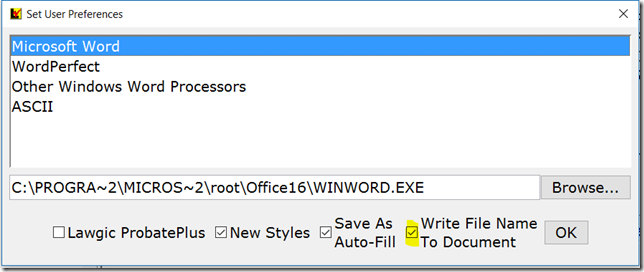
New ‘Write File Name to Document’ Feature
You can now send a single page at the end of our document containing the name of the answer file used to generate the document. It is not anticipated that this would be provided to the client, but it can help find the client’s base answer file when preparing additional documents. To activate this option for your documents, go to the Preferences dialog box, and check the new option to Write File Name to Document.
* * * * *
To view those questions that are new in this update, or where Law & Strategy, choices, or default answers have changed, use the "Up_June16" flag file. From inside Lawgic, open any existing answer file; on the Flags menu, click Open Flags, select the appropriate Title (click OK), and next select the "Up_ June16" flag file (and click OK). To view all flagged questions, click Expand All on the Answers menu and scroll the Navigator. Flagged questions will be indicated with blue bold text.
Please continue to send us your suggestions on existing or new products. Contact our Technical Support Department at 1-877-2-LAWGIC (252-9442) or e-mail us at support@lawgic.com.
Copyright (c) 2016 Lawgic, LLC, a Florida limited liability company (“Lawgic”).
All Rights Reserved. Lawgic and Intelligent Legal Technology are registered trademarks of Lawgic, LLC.