
Florida Wills & Trusts
November 2014 Update
_______________________________________________________________
New Options to Provide for Pets in Clause Bank
When drafting a will or trust, you can now use the clause bank to draft a ‘Pet trust’ option, choosing either a specific gift or a residuary devise, to be held in trust for one or more pets. Some extra options provide flexibility in coordination with the Florida statute. Question 1519 and New Questions 1526-1537
New Add Custom Provisions Option for DPA
To provide greater flexibility, you now have the option to add a custom provision to the end of each major section of the DPA, allowing special language to go where it fits best, and the numbering to flow naturally. New Questions 1255-1268.
New HIPAA Authorization Form Added
In some instances, the Florida Designation of Health Care Surrogate may not give medical providers the comfort they need to share relevant medical information because the client is not incapacitated (or there is a concern about capacity). This form gives the person named full access to all HIPAA protected information without being named as an agent or having to prove the incapacity of the principal. Question 10, and New Questions 1342-1346
New Living Will Explanation Page
A new question gives you the choice to add a page for the client at the end of a living will explaining the terms used. New Question 9
New Advanced Directives Cover Page
You now have the option to add an “Advanced Directives” cover page when you select more than one DPA document. In addition, the client name has been added to the title of each document. Questions 5 and 1133
New Font Size Feature
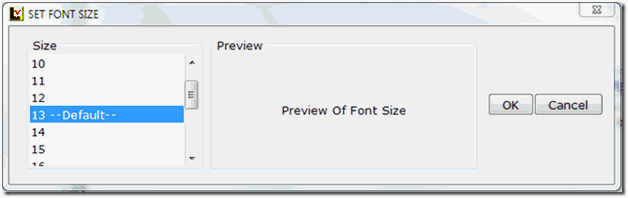
For greater readability and convenience, a new ‘Font’ feature has been added to the Lawgic Menu Bar. It allows the user to set the font size from 8 to 24 pt. The default font size is set to 13 pt. Upon exit, the preferred font size can be saved.
New Multi-Select Search Feature
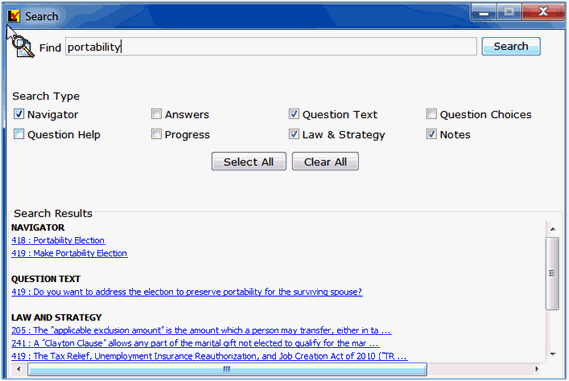
The Search feature (on Menu Bar) allows a user to find specific text within sections of the program. We have added two new areas for searching: ‘Question Text,’ meaning the text that makes up each question, and ‘Question Choices,’ which are the options shown for each question as well as a multi-select feature in which more than one area can be searched at the same time.
* * * * *
To view those questions that are new in this update, or where Law & Strategy, choices, or default answers have changed, use the "Up_Nov14" flag file. From inside Lawgic, open any existing answer file; on the Flags menu, click Open Flags, select the appropriate Title (click OK), and next select the "Up_ Nov14" flag file (and click OK). To view all flagged questions, click Expand All on the Answers menu and scroll the Navigator. Flagged questions will be indicated with blue bold text.
Please continue to send us your suggestions on existing or new products. Contact our Technical Support Department at 1-877-2-LAWGIC (252-9442) or e-mail us at support@lawgic.com.
Copyright (c) 2014 Lawgic, LLC, a Florida limited liability company (“Lawgic”).
All Rights Reserved. Lawgic and Intelligent Legal Technology are registered trademarks of Lawgic, LLC.